AI Search
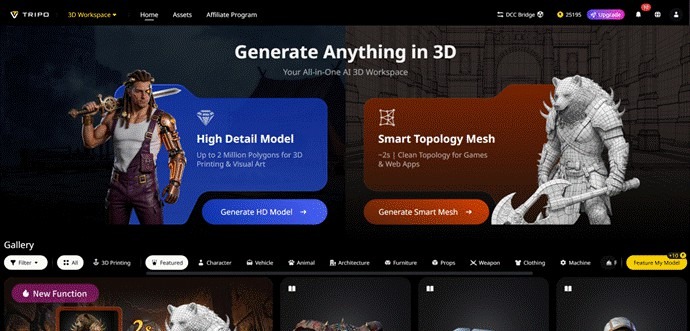
For 3D artists, designers, and indie developers, the traditional asset creation pipeline has long been a source of frustration: hours spent manually modeling, tedious retopology work, repetitive texture painting, and the constant need to switch between disjointed tools just to finish a single asset. This fragmented workflow slows creativity, delays deadlines, and locks advanced 3D production behind a steep learning curve.
Today, Tripo Studio—the world’s first all-in-one AI 3D model generator, eliminates these pain points entirely. Built as a unified browser-based environment, it lets creators turn ideas into production-ready 3D assets without ever leaving the platform. At its core, Tripo’s
20-billion+ parameter AI algorithm delivers industry-leading geometric accuracy and material realism: a standard untextured model generates in just 20 seconds, while its High Detail Model mode crafts meshes with up to 2 million polygons—ideal for 3D printing and
high-fidelity visual art. For game developers and web apps, the Smart Topology Mesh option outputs clean, optimized geometry in roughly 2 seconds, ready for real-time rendering.
What truly sets Tripo apart is its accessibility: from free Basic plans for curious beginners to enterprise-grade solutions for scaling studios, it makes professional 3D creation inclusive. No longer a niche novelty, Tripo Studio stands as a legitimate production platform that redefines how 3D assets are built—fast, intuitive, and entirely in one place.
Core Features of Tripo Studi Text to 3D Model
Turn plain text descriptions into complete, structured 3D models with a single prompt, powered by advanced high-parameter AI algorithms.
It solves the problem of blank-canvas modeling struggles and lengthy manual concept drafting, removing barriers for creators without advanced modeling skills.
Users get production-ready geometry with two quality modes, balancing speed and detail to fit different project needs.
1. image to 3D Model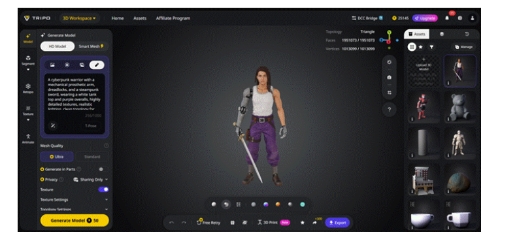
Convert single photos, sketches or multi-view reference images to 3d modelinto accurate, well-proportioned 3D models seamlessly.
It cuts out manual image tracing and complex 3D reconstruction work, speeding up the transition from visual reference to digital asset.
Built-in image optimization tools refine input materials, ensuring finer details and higher model accuracy after generation.
2. AI Model Segmentation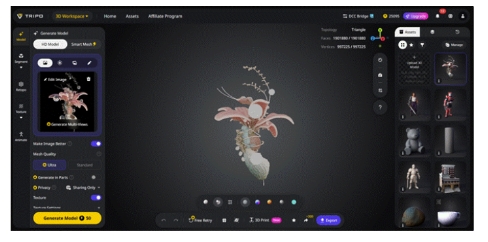
Automatically split full 3D models into logical, editable components without manual mesh splitting.
It simplifies targeted asset editing and modular reuse, solving the hassle of managing complex meshes as a single unit.
Each segmented part can be textured, adjusted or exported independently, with built-in tools to repair mesh gaps and imperfections.
3. AI Retopology
Automatically generate clean, optimized triangle or quad meshes for better compatibility and performance.
It fixes messy, unoptimized topology and eliminates hours of manual mesh cleanup work.
The final meshes are lightweight, engine-friendly, and integrate smoothly into mainstream 3D software and game engines.
4. AI Texturing
Generate PBR-ready, high-quality AI texturesvia text prompts or reference images, with optional 4K upscale support.
It removes repetitive manual texture painting and UV layout work, drastically cutting texture production time.
Finished textures are compatible with Unity, Unreal, Blender and other mainstream platforms, ready for direct use.
5. Auto Rigging
Generate complete skeletons and skin weights for characters and creatures with just one click, no manual rigging needed.
It streamlines animation preparation and eliminates the technical learning curve of manual rigging.
Supports both humanoid and animal rigs, paired with a built-in motion library for quick animation preview.
Real-World Use Cases
Game Development: Create game-ready characters, props and environments quickly, with optimized meshes for real-time rendering.
Archviz: Generate furniture, interior decor and architectural elements for fast, realistic scene visualization.
3D Printing: Produce watertight, printable models with segmented parts for smooth physical production.
Product Design: Turn sketches or product photos into 3D models for e-commerce display and design validation.
VFX & Metaverse: Build scalable, high-quality assets for immersive virtual environments and visual effects.
Key Advantages
Tripo Studio stands out by putting professional-grade 3D creation within everyone’s reach, without unnecessary complexity. The platform generates complete 3D assets in seconds to minutes, slashing project timelines significantly. Every output delivers polished, production-ready quality, with clean topology and realistic textures perfect for professional workflows. Best of all, it requires no advanced 3D technical skills—its intuitive interface lets beginners create quality assets easily. As an all-in-one workspace, it eliminates the need to switch between multiple modeling, texturing and rigging tools, keeping the entire workflow seamless and efficient.
Quick Step-by-Step Tutorial
Upload a reference image or type a detailed text prompt into Tripo Studio.
Select your preferred quality mode and click to generate your 3D model.
Run AI segmentation and retopology to optimize the mesh for professional use.
Use AI texturing to add realistic PBR materials to your asset.
Preview the finished asset and export it in your desired file format.
Conclusion & Call to Action
Tripo Studio redefines modern 3D asset creation, replacing tedious, technical workflows with fast, intuitive AI-powered tools. Whether you’re an indie creator, a professional designer or a development team, it simplifies every stage of 3D production while maintaining top-tier output quality.
Media Contact
Company Name: Tripo3D
Contact Person: Andrew Jackson
Email: Send Email
Country: United States
Website: Tripo3D.com